<?xml version="1.0" encoding="utf-8"?><feed xmlns="http://www.w3.org/2005/Atom" ><generator uri="https://jekyllrb.com/" version="4.3.2">Jekyll</generator><link href="/feed.xml" rel="self" type="application/atom+xml" /><link href="/" rel="alternate" type="text/html" /><updated>2024-02-12T12:48:11+00:00</updated><id>/feed.xml</id><title type="html">Homelab.lt</title><subtitle>Personal exploration while developing and administering IT systems, profesionaly and just for fun.</subtitle><entry><title type="html">First time terraform (the hard way using libvirt)</title><link href="/2024/02/12/first-time-terraform-the-hard-way-using-libvirt.html" rel="alternate" type="text/html" title="First time terraform (the hard way using libvirt)" /><published>2024-02-12T12:06:00+00:00</published><updated>2024-02-12T12:06:00+00:00</updated><id>/2024/02/12/first-time-terraform-the-hard-way-using-libvirt</id><content type="html" xml:base="/2024/02/12/first-time-terraform-the-hard-way-using-libvirt.html"><![CDATA[<p>I decided to terraform to manage VMs on my home lab server.</p>

<p>The first step was to install the Terraform tool (I am using Debian), so I followed their tutorial: <a href="https://developer.hashicorp.com/terraform/tutorials/aws-get-started/install-cli">https://developer.hashicorp.com/terraform/tutorials/aws-get-started/install-cli</a> that worked great, no issues.</p>

<p>Next, I need something simple to prove that something is working, so why not create a simple Hello World project (or copy and paste from somewhere?)</p>

<p>Let’s create a main.tf file with contents:</p>

<div class="language-plaintext highlighter-rouge"><div class="highlight"><pre class="highlight"><code>resource "null_resource" "default" {
  provisioner "local-exec" {
    command = "echo 'Hello World'"
  }
}
</code></pre></div></div>

<p>Then, to start this project, you need to run the following:</p>
<div class="language-plaintext highlighter-rouge"><div class="highlight"><pre class="highlight"><code>terraform init
</code></pre></div></div>

<p>It downloads if something is needed.</p>

<p>To run this plan, you can run a command to see the terraform plan (what it intends to do):</p>
<div class="language-plaintext highlighter-rouge"><div class="highlight"><pre class="highlight"><code>terraform plan
</code></pre></div></div>

<p>And when it looks ok, you can run the command (it will ask you to write yes):</p>
<div class="language-plaintext highlighter-rouge"><div class="highlight"><pre class="highlight"><code>terraform apply
</code></pre></div></div>

<div class="language-plaintext highlighter-rouge"><div class="highlight"><pre class="highlight"><code>hello-world$ terraform apply

Terraform used the selected providers to generate the following execution plan. Resource actions are indicated with the following symbols:
  + Create

Terraform will perform the following actions:

  # null_resource.default will be created
  + resource "null_resource" "default" {
      + id = (known after apply)
    }

Plan: 1 to add, 0 to change, 0 to destroy.

Do you want to perform these actions?
  Terraform will perform the actions described above.
  Only 'yes' will be accepted to approve.

  Enter a value: yes.

null_resource.default: Creating...
null_resource.default: Provisioning with 'local-exec'...
null_resource.default (local-exec): Executing: ["/bin/sh" "-c" "echo 'Hello World'"]
null_resource.default (local-exec): Hello World
null_resource.default: Creation complete after 0s [id=589244851261473893]
</code></pre></div></div>

<p>Good, at this point, that was simple. But boy, I spent days trying to build a working Debian VM using libvirt.</p>
<h2 id="first-issue">First issue:</h2>
<p>I wanted Terraform to manage the remote libvirt server via SSH. All examples didn’t work; they complained that the SSH server wasn’t in the known host list (I tried adding known hosts and known_hosts, but that just refused to work). So, I went this route:</p>

<div class="language-plaintext highlighter-rouge"><div class="highlight"><pre class="highlight"><code>  uri = "qemu+ssh://markom@homelab.lt:9022/system?known_hosts_verify=ignore"
</code></pre></div></div>

<h2 id="second-issue">Second issue:</h2>
<p>There was a weird permission issue that looked like Terraform couldn’t manage VM images; I tried multiple folders and setting permissions to 777, but nothing worked.
Then I found this issue:
https://github.com/dmacvicar/terraform-provider-libvirt/issues/546</p>

<p>So, just changing this file /etc/apparmor.d/libvirt/TEMPLATE.qemu it worked:</p>
<div class="language-plaintext highlighter-rouge"><div class="highlight"><pre class="highlight"><code>#
# This profile is for the domain whose UUID matches this file.
#

#include &lt;tunables/global&gt;

profile LIBVIRT_TEMPLATE flags=(attach_disconnected) {
  #include &lt;abstractions/libvirt-qemu&gt;
  /var/lib/libvirt/images/**.qcow2 rwk, /var/lib/libvirt/images/**.raw rwk, /var/lib/libvirt/images/**.img rwk,
}
</code></pre></div></div>

<h2 id="third-issue">Third issue:</h2>

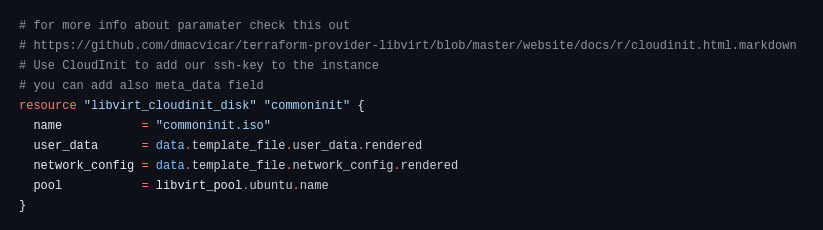
<p><img src="/uploads/Screenshot%20from%202024-02-12%2014-33-00.png" alt="Screenshot from 2024-02-12 14-33-00.png" />
network_config and user_data can’t be set at the same time, so I decided for now go with default network settings (holy cow, I spent too long on this)</p>

<h2 id="fourth-issue">Fourth issue:</h2>
<p>For some reason, qemu-guest-agent after installing doesn’t start, so I needed to add this line to cloud_init.yml:</p>
<div class="language-plaintext highlighter-rouge"><div class="highlight"><pre class="highlight"><code>runcmd:
  - [ systemctl, start, qemu-guest-agent ]
</code></pre></div></div>

<h2 id="fifth-issue">Fifth issue:</h2>
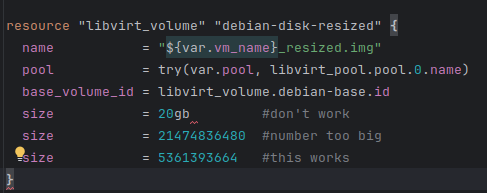
<p><img src="/uploads/Screenshot%20from%202024-02-12%2014-42-26.png" alt="Screenshot from 2024-02-12 14-42-26.png" /></p>

<p>The issue is described here: <a href="https://github.com/hashicorp/terraform/issues/3287">https://github.com/hashicorp/terraform/issues/3287</a></p>

<h1 id="final-result">Final result:</h1>
<p><a href="https://github.com/Markomas/terraform_debian">https://github.com/Markomas/terraform_debian</a></p>]]></content><author><name></name></author><summary type="html"><![CDATA[I decided to terraform to manage VMs on my home lab server.]]></summary></entry><entry><title type="html">First time using Apache Pulsar (Pulsar Manager UI setup)</title><link href="/2023/11/28/first-time-using-apache-pulsar.html" rel="alternate" type="text/html" title="First time using Apache Pulsar (Pulsar Manager UI setup)" /><published>2023-11-28T13:46:00+00:00</published><updated>2023-11-28T13:46:00+00:00</updated><id>/2023/11/28/first-time-using-apache-pulsar</id><content type="html" xml:base="/2023/11/28/first-time-using-apache-pulsar.html"><![CDATA[<p>Yesterday, I was in a job interview, and they asked me if I ever used Apache Pulsar.
After a short Google search, it looks like Kafka on drugs.
It’s time to do a quick run with Docker and check its performance.</p>

<h1 id="docker-setup">Docker setup</h1>

<p>Well, because I want pulsar with the manager, I used a sample docker-compose.yml file:</p>

<div class="language-yaml highlighter-rouge"><div class="highlight"><pre class="highlight"><code><span class="na">version</span><span class="pi">:</span> <span class="s2">"</span><span class="s">3.7"</span>
<span class="na">services</span><span class="pi">:</span>
  <span class="na">pulsar</span><span class="pi">:</span>
    <span class="na">image</span><span class="pi">:</span> <span class="s">apachepulsar/pulsar:2.6.0</span>
    <span class="na">command</span><span class="pi">:</span> <span class="s">bin/pulsar standalone</span>
    <span class="na">hostname</span><span class="pi">:</span> <span class="s">pulsar</span>
    <span class="na">ports</span><span class="pi">:</span>
      <span class="pi">-</span> <span class="s2">"</span><span class="s">8081:8080"</span>
      <span class="pi">-</span> <span class="s2">"</span><span class="s">6650:6650"</span>
    <span class="na">restart</span><span class="pi">:</span> <span class="s">unless-stopped</span>
    <span class="na">volumes</span><span class="pi">:</span>
      <span class="pi">-</span> <span class="s2">"</span><span class="s">./data/:/pulsar/data"</span>
  <span class="na">dashboard</span><span class="pi">:</span>
    <span class="na">image</span><span class="pi">:</span> <span class="s">apachepulsar/pulsar-manager:v0.2.0</span>
    <span class="na">ports</span><span class="pi">:</span>
      <span class="pi">-</span> <span class="s2">"</span><span class="s">9527:9527"</span>
      <span class="pi">-</span> <span class="s2">"</span><span class="s">7750:7750"</span>
    <span class="na">depends_on</span><span class="pi">:</span>
      <span class="pi">-</span> <span class="s">pulsar</span>
    <span class="na">links</span><span class="pi">:</span>
      <span class="pi">-</span> <span class="s">pulsar</span>
    <span class="na">environment</span><span class="pi">:</span>
      <span class="na">SPRING_CONFIGURATION_FILE</span><span class="pi">:</span> <span class="s">/pulsar-manager/pulsar-manager/application.properties</span>
</code></pre></div></div>

<p>Just run <code class="language-plaintext highlighter-rouge">docker-compose up</code></p>

<p>Then, on the local box run this command to create a user and password:</p>

<div class="language-shell highlighter-rouge"><div class="highlight"><pre class="highlight"><code>    <span class="nv">CSRF_TOKEN</span><span class="o">=</span><span class="si">$(</span>curl http://localhost:7750/pulsar-manager/csrf-token<span class="si">)</span>
    curl <span class="se">\</span>
       <span class="nt">-H</span> <span class="s1">'X-XSRF-TOKEN: $CSRF_TOKEN'</span> <span class="se">\</span>
       <span class="nt">-H</span> <span class="s1">'Cookie: XSRF-TOKEN=$CSRF_TOKEN;'</span> <span class="se">\</span>
       <span class="nt">-H</span> <span class="s2">"Content-Type: application/json"</span> <span class="se">\</span>
       <span class="nt">-X</span> PUT http://localhost:7750/pulsar-manager/users/superuser <span class="se">\</span>
       <span class="nt">-d</span> <span class="s1">'{"name": "admin", "password": "apachepulsar", "description": "test", "email": "username@test.org"}'</span>
</code></pre></div></div>

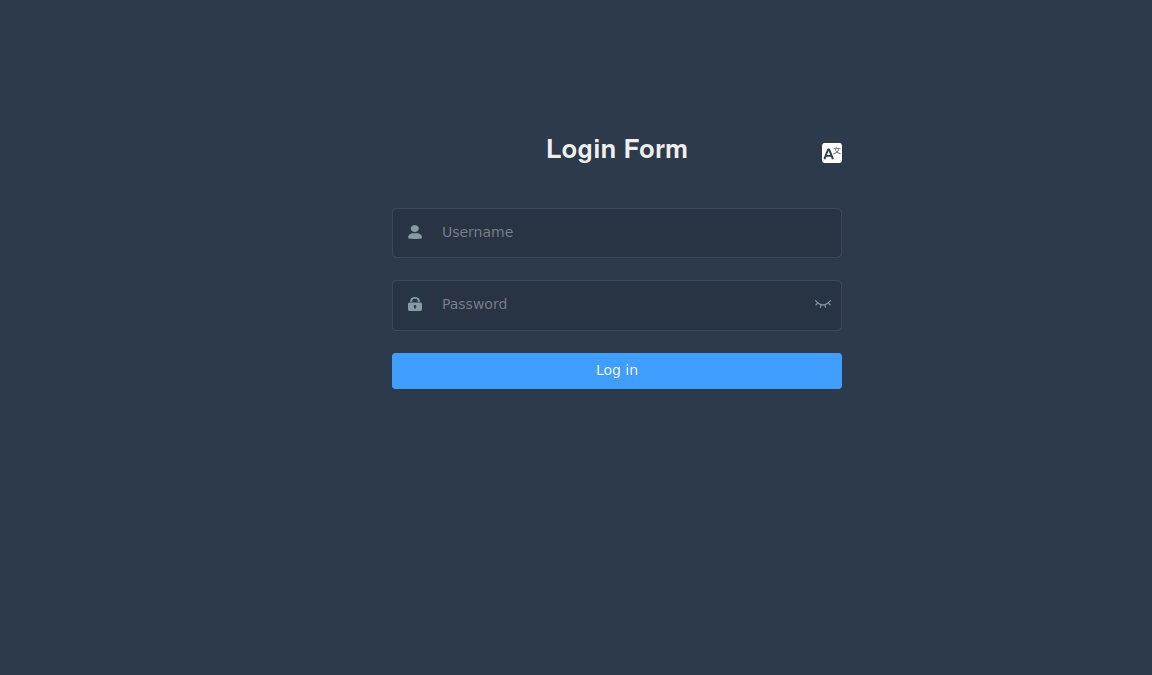
<p>Then in the browser just go to: <a href="http://localhost:9527/#/environments">http://localhost:9527/#/environments</a>
And we are greeted with the login page:
<img src="/uploads/Screenshot%20from%202023-11-28%2017-42-28.png" alt="Screenshot from 2023-11-28 17-42-28.png" /></p>

<p>User: <strong>admin</strong>
Password: <strong>apachepulsar</strong></p>

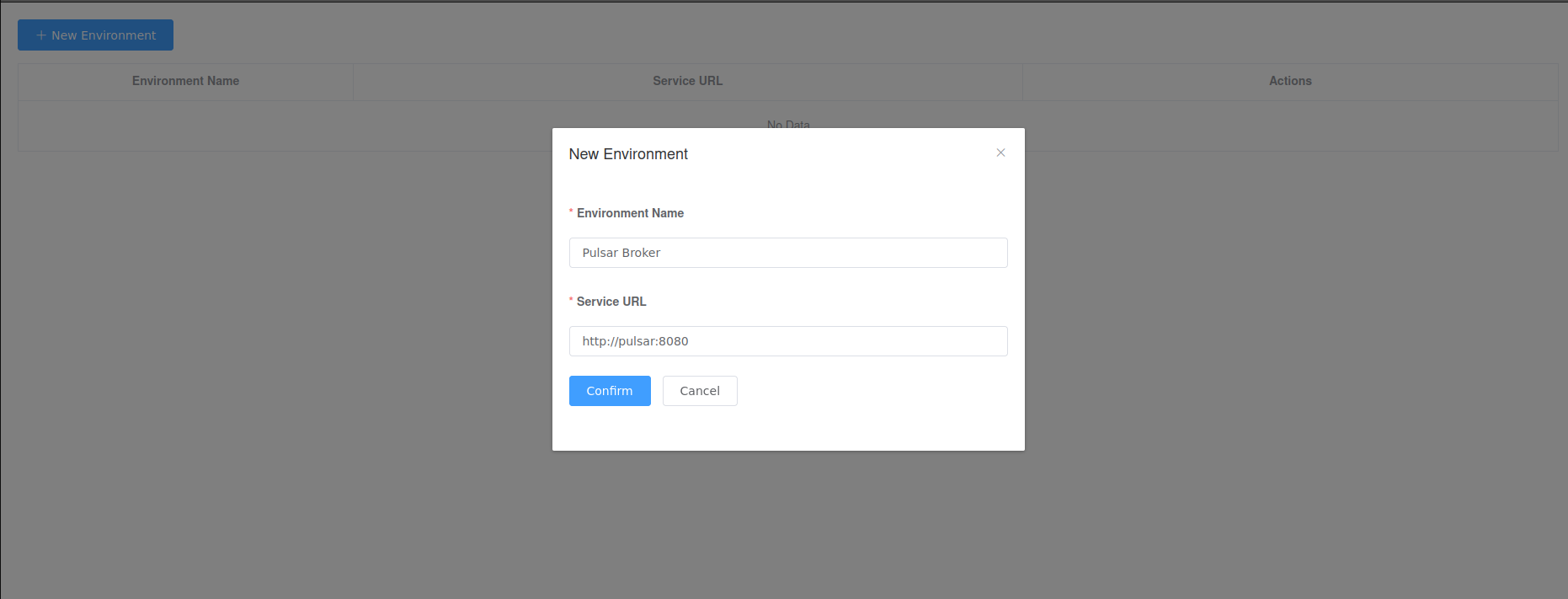
<p>In this window, we can add a new environment (Pulsar Broker):
<img src="/uploads/Screenshot%20from%202023-11-28%2017-55-41.png" alt="Screenshot from 2023-11-28 17-55-41.png" /></p>

<p>It seems to be working… Useless, but working…
Using CLI commands, you can create topics/messages/subscribe to all good topics.
The next things on the todo list: Pulsar SQL, tiered storage, transactions, adding security…
But I will explore it further in the next posts.</p>]]></content><author><name></name></author><summary type="html"><![CDATA[Yesterday, I was in a job interview, and they asked me if I ever used Apache Pulsar. After a short Google search, it looks like Kafka on drugs. It’s time to do a quick run with Docker and check its performance.]]></summary></entry><entry><title type="html">Trying to talk with torrent trackers via DHT using PHP (part 1 - Ping)</title><link href="/2023/11/23/trying-to-talk-with-torrent-trackers-via-dht-using-php.html" rel="alternate" type="text/html" title="Trying to talk with torrent trackers via DHT using PHP (part 1 - Ping)" /><published>2023-11-23T21:14:00+00:00</published><updated>2023-11-23T21:14:00+00:00</updated><id>/2023/11/23/trying-to-talk-with-torrent-trackers-via-dht-using-php</id><content type="html" xml:base="/2023/11/23/trying-to-talk-with-torrent-trackers-via-dht-using-php.html"><![CDATA[<p>Yo, I have decided to implement an interesting thing:
Why not try to create a DHT client in PHP, just for fun? Maybe I would be able to scrap the DHT network with PHP?</p>

<p>So, first thing first: I have no idea how DHT works 😞</p>

<p>From a quick Google search, I see that there is no working example of this in PHP 😞 😞 😞</p>

<p>But I found this:</p>

<figure class="highlight"><pre><code class="language-python" data-lang="python">    <span class="kn">import</span> <span class="n">bencode</span>
    <span class="kn">import</span> <span class="n">random</span>
    <span class="kn">import</span> <span class="n">socket</span>
    
    
    <span class="c1"># Generate a 160-bit (20-byte) random node ID.
</span>    <span class="n">my_id</span> <span class="o">=</span> <span class="sh">''</span><span class="p">.</span><span class="nf">join</span><span class="p">([</span><span class="nf">chr</span><span class="p">(</span><span class="n">random</span><span class="p">.</span><span class="nf">randint</span><span class="p">(</span><span class="mi">0</span><span class="p">,</span> <span class="mi">255</span><span class="p">))</span> <span class="k">for</span> <span class="n">_</span> <span class="ow">in</span> <span class="nf">range</span><span class="p">(</span><span class="mi">20</span><span class="p">)])</span>
    
    <span class="c1"># Create ping query and bencode it.
</span>    <span class="c1"># "'y': 'q'" is for "query".
</span>    <span class="c1"># "'t': '0f'" is a transaction ID which will be echoed in the response.
</span>    <span class="c1"># "'q': 'ping'" is a query type.
</span>    <span class="c1"># "'a': {'id': my_id}" is arguments. In this case there is only one argument -
</span>    <span class="c1"># our node ID.
</span>    <span class="n">ping_query</span> <span class="o">=</span> <span class="p">{</span><span class="sh">'</span><span class="s">y</span><span class="sh">'</span><span class="p">:</span> <span class="sh">'</span><span class="s">q</span><span class="sh">'</span><span class="p">,</span>
                  <span class="sh">'</span><span class="s">t</span><span class="sh">'</span><span class="p">:</span> <span class="sh">'</span><span class="s">0f</span><span class="sh">'</span><span class="p">,</span>
                  <span class="sh">'</span><span class="s">q</span><span class="sh">'</span><span class="p">:</span> <span class="sh">'</span><span class="s">ping</span><span class="sh">'</span><span class="p">,</span>
                  <span class="sh">'</span><span class="s">a</span><span class="sh">'</span><span class="p">:</span> <span class="p">{</span><span class="sh">'</span><span class="s">id</span><span class="sh">'</span><span class="p">:</span> <span class="n">my_id</span><span class="p">}}</span>
    <span class="n">ping_query_bencoded</span> <span class="o">=</span> <span class="n">bencode</span><span class="p">.</span><span class="nf">bencode</span><span class="p">(</span><span class="n">ping_query</span><span class="p">)</span>
    
    <span class="c1"># Send a datagram to a server and recieve a response.
</span>    <span class="n">s</span> <span class="o">=</span> <span class="n">socket</span><span class="p">.</span><span class="nf">socket</span><span class="p">(</span><span class="n">socket</span><span class="p">.</span><span class="n">AF_INET</span><span class="p">,</span> <span class="n">socket</span><span class="p">.</span><span class="n">SOCK_DGRAM</span><span class="p">)</span>
    <span class="n">s</span><span class="p">.</span><span class="nf">sendto</span><span class="p">(</span><span class="n">ping_query_bencoded</span><span class="p">,</span>
             <span class="p">(</span><span class="n">socket</span><span class="p">.</span><span class="nf">gethostbyname</span><span class="p">(</span><span class="sh">'</span><span class="s">router.bittorrent.com</span><span class="sh">'</span><span class="p">),</span> <span class="mi">6881</span><span class="p">))</span>
    <span class="n">r</span> <span class="o">=</span> <span class="n">s</span><span class="p">.</span><span class="nf">recvfrom</span><span class="p">(</span><span class="mi">1024</span><span class="p">)</span>
    
    <span class="n">ping_response</span> <span class="o">=</span> <span class="n">bencode</span><span class="p">.</span><span class="nf">bdecode</span><span class="p">(</span><span class="n">r</span><span class="p">[</span><span class="mi">0</span><span class="p">])</span>
    
    <span class="nf">print</span><span class="p">(</span><span class="n">ping_response</span><span class="p">)</span></code></pre></figure>

<p>So, I should be able to implement this in PHP, should be fun:D</p>

<h3 id="bencode">Bencode</h3>
<p>A quick search, and I got this:</p>
<div class="language-plaintext highlighter-rouge"><div class="highlight"><pre class="highlight"><code>composer require rych/bencode
</code></pre></div></div>

<p>Somebody would call that cheating, I call it: <strong>progress</strong> 😈</p>

<h3 id="final-ping-result">Final ping result</h3>

<div class="language-php highlighter-rouge"><div class="highlight"><pre class="highlight"><code><span class="cp">&lt;?php</span>

<span class="kn">use</span> <span class="nc">Rych\Bencode\Bencode</span><span class="p">;</span>

<span class="k">include_once</span> <span class="k">__DIR__</span> <span class="mf">.</span> <span class="s1">'/vendor/autoload.php'</span><span class="p">;</span>

<span class="nv">$socket</span><span class="o">=@</span><span class="nb">fsockopen</span><span class="p">(</span><span class="s2">"udp://router.bittorrent.com"</span><span class="p">,</span><span class="mi">6881</span><span class="p">,</span><span class="nv">$err_no</span><span class="p">,</span><span class="nv">$err_str</span><span class="p">,</span><span class="mi">1</span><span class="p">);</span>
<span class="k">if</span><span class="p">(</span><span class="o">!</span><span class="nv">$socket</span><span class="p">)</span> <span class="k">die</span><span class="p">(</span><span class="s1">'socket failed'</span><span class="p">);</span>

<span class="nv">$myId</span> <span class="o">=</span> <span class="nf">generateId</span><span class="p">();</span>
<span class="k">print</span> <span class="s1">'ping'</span><span class="mf">.</span><span class="kc">PHP_EOL</span><span class="p">;</span>
<span class="nb">fwrite</span><span class="p">(</span><span class="nv">$socket</span><span class="p">,</span> <span class="nc">Bencode</span><span class="o">::</span><span class="nf">encode</span><span class="p">([</span>
    <span class="s1">'y'</span> <span class="o">=&gt;</span> <span class="s1">'q'</span><span class="p">,</span>
    <span class="s1">'t'</span> <span class="o">=&gt;</span> <span class="s1">'0f'</span><span class="p">,</span>
    <span class="s1">'q'</span> <span class="o">=&gt;</span> <span class="s1">'ping'</span><span class="p">,</span>
    <span class="s1">'a'</span> <span class="o">=&gt;</span> <span class="p">[</span>
        <span class="s1">'id'</span> <span class="o">=&gt;</span> <span class="nv">$myId</span>
    <span class="p">]]));</span>
<span class="nv">$packetReceived</span><span class="o">=</span><span class="nb">fread</span><span class="p">(</span><span class="nv">$socket</span><span class="p">,</span><span class="mi">1024</span><span class="p">);</span>
<span class="nb">var_dump</span><span class="p">(</span><span class="nc">Bencode</span><span class="o">::</span><span class="nf">decode</span><span class="p">(</span><span class="nv">$packetReceived</span><span class="p">));</span>
</code></pre></div></div>]]></content><author><name></name></author><summary type="html"><![CDATA[Yo, I have decided to implement an interesting thing: Why not try to create a DHT client in PHP, just for fun? Maybe I would be able to scrap the DHT network with PHP?]]></summary></entry><entry><title type="html">Jekyll setup</title><link href="/2023/11/23/jekyll-setup.html" rel="alternate" type="text/html" title="Jekyll setup" /><published>2023-11-23T00:00:00+00:00</published><updated>2023-11-23T00:00:00+00:00</updated><id>/2023/11/23/jekyll-setup</id><content type="html" xml:base="/2023/11/23/jekyll-setup.html"><![CDATA[<p>So, as the first post, I will describe how I set up this page (it will be short because I already forgot some things 😛</p>

<h1 id="jekyll-install-journey">Jekyll install journey:</h1>
<p>I followed these instructions:
https://jekyllrb.com/docs/</p>

<p>But, for some reason, I used some old instructions and spent understanding strange ruby/gem errors. Never used it, so it was a mystery to me.
But somehow, I got it working.</p>

<p>Then, because I am lazy and sometimes I prefer a nice GUI over editing config files, I Google searched for Jekyll admin. 
And what I found: https://github.com/jekyll/jekyll-admin</p>

<p>Just added these to Gemfile</p>
<div class="language-plaintext highlighter-rouge"><div class="highlight"><pre class="highlight"><code>gem 'jekyll-admin', group: :jekyll_plugins
</code></pre></div></div>

<p>And ran these commands:</p>

<div class="language-plaintext highlighter-rouge"><div class="highlight"><pre class="highlight"><code>bundle install
bundle exec jekyll serve --livereload
</code></pre></div></div>

<p>And after opening:
http://localhost:4000/admin/</p>

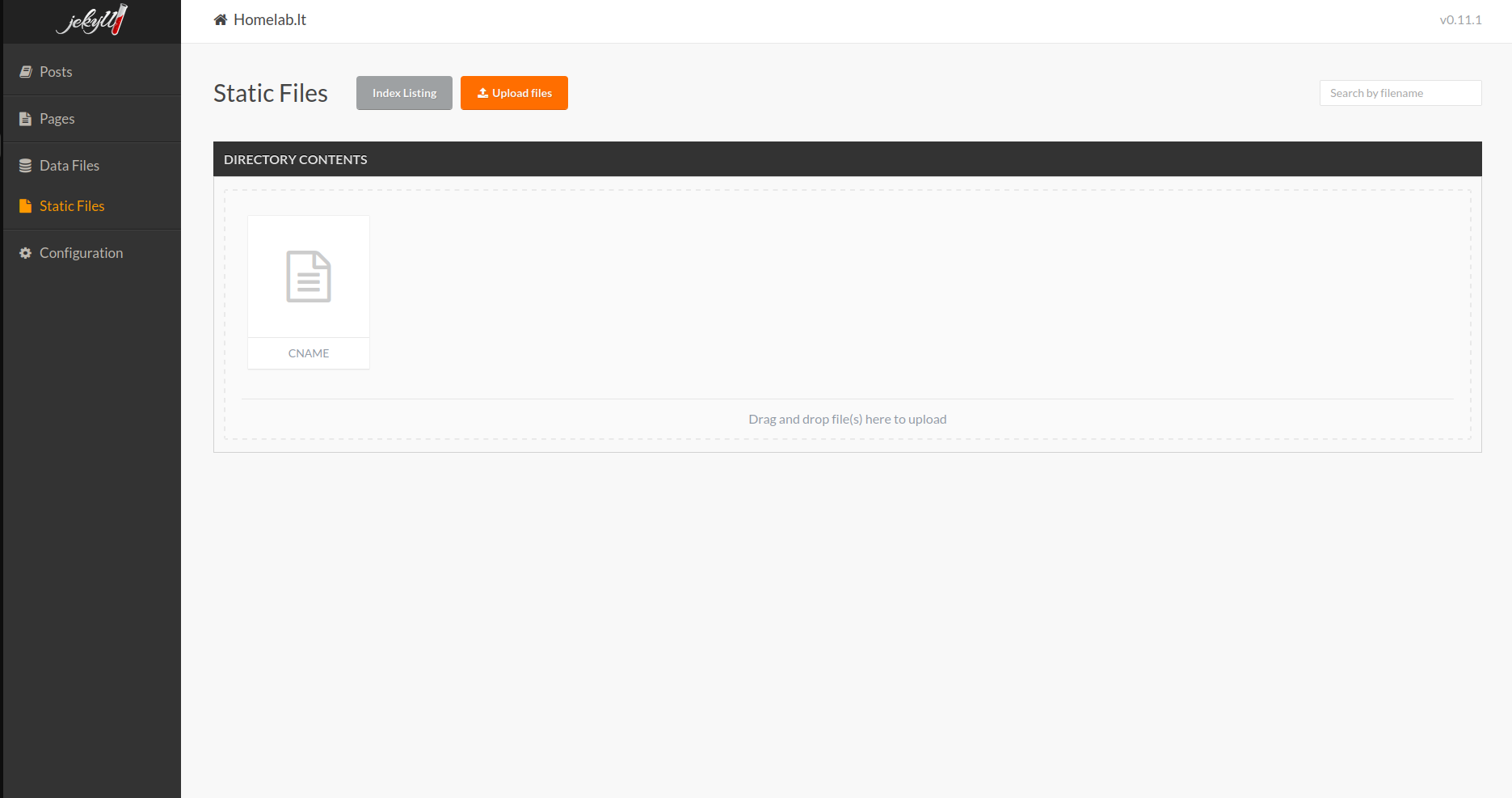
<p>I was greeted with the similar page:
<img src="/assets/images/posts/2023-11-23-jekyll-setup/admin.png" alt="Administrator" /></p>

<blockquote>
  <p>Well after using it, I will probably try to find something better, because image management for blog posts isn’t smooth.
But for now it will be fine.</p>
</blockquote>

<h1 id="time-to-publish-it-for-free-well-i-have-a-domain-but-hosting-is-free">Time to publish it for free (well I have a domain, but hosting is free)</h1>
<p>So how do we get free hosting, that we can trust (well not fully, but it should be stable enough for me)</p>

<p>It’s <strong>github</strong>, you will ask how? Github is just for source code, you still need hosting. But nah, github has a neat feature called ‘Pages’.</p>

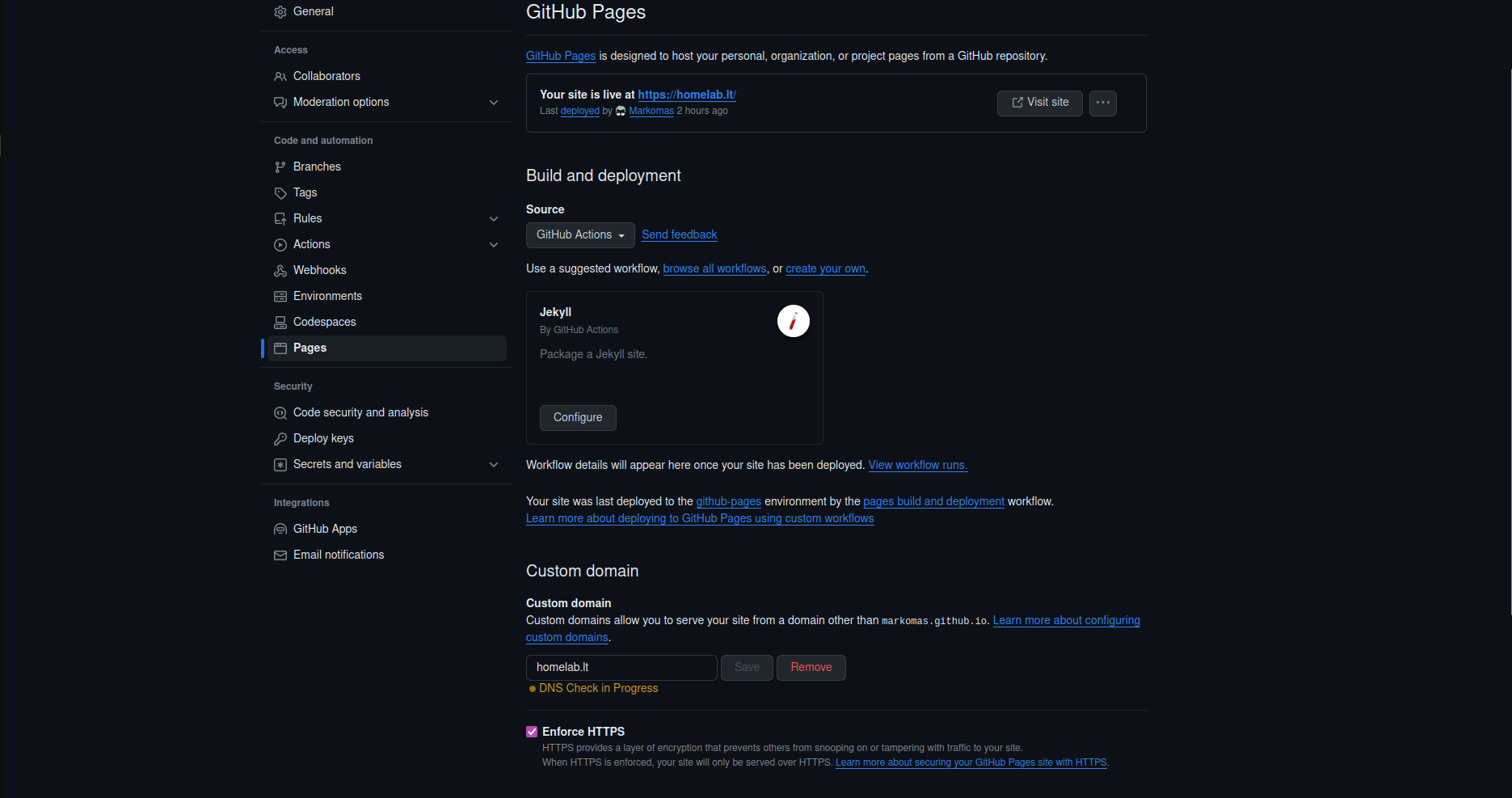
<p>I will create, github public project here: https://github.com/Markomas/blogas
Then I will go to Settings -&gt; Pages
<img src="/assets/images/posts/2023-11-23-jekyll-setup/pages.png" alt="Administrator" /></p>

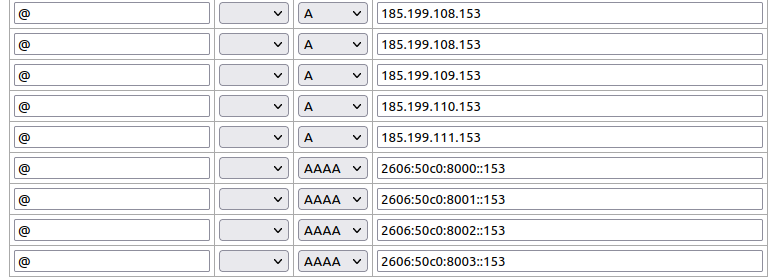
<p>And my domain registrar:
<img src="/assets/images/posts/2023-11-23-jekyll-setup/iv.png" alt="iv.lt" /></p>

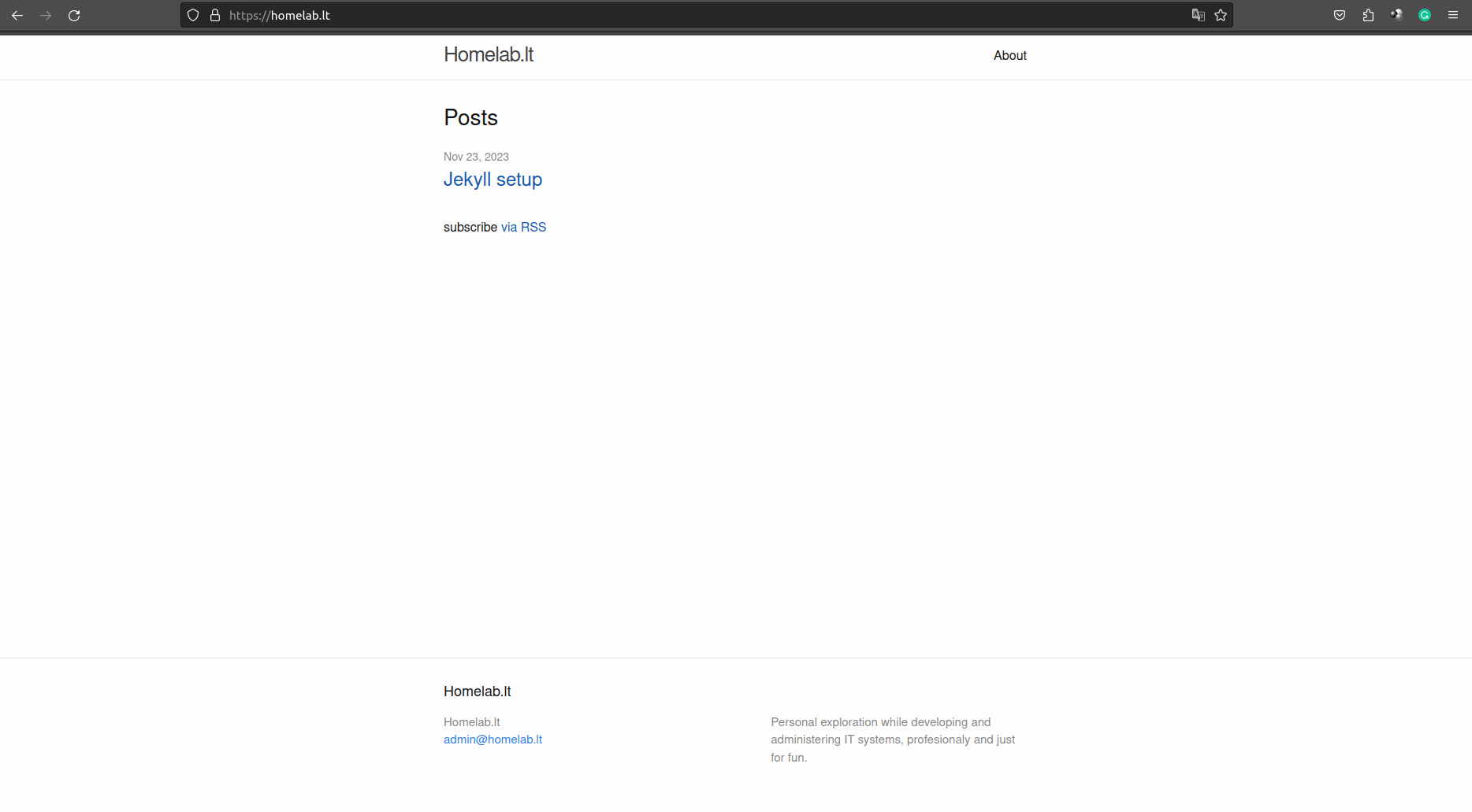
<p>Final result:
<img src="/uploads/Screenshot%20from%202023-11-23%2021-29-32.png" alt="Screenshot from 2023-11-23 21-29-32.png" /></p>]]></content><author><name></name></author><summary type="html"><![CDATA[So, as the first post, I will describe how I set up this page (it will be short because I already forgot some things 😛]]></summary></entry></feed>